usb开发指南
概述
USB(Universal Serial Bus,通用串行总线)是用于连接计算机与外设的串行接口标准。
USB系统架构
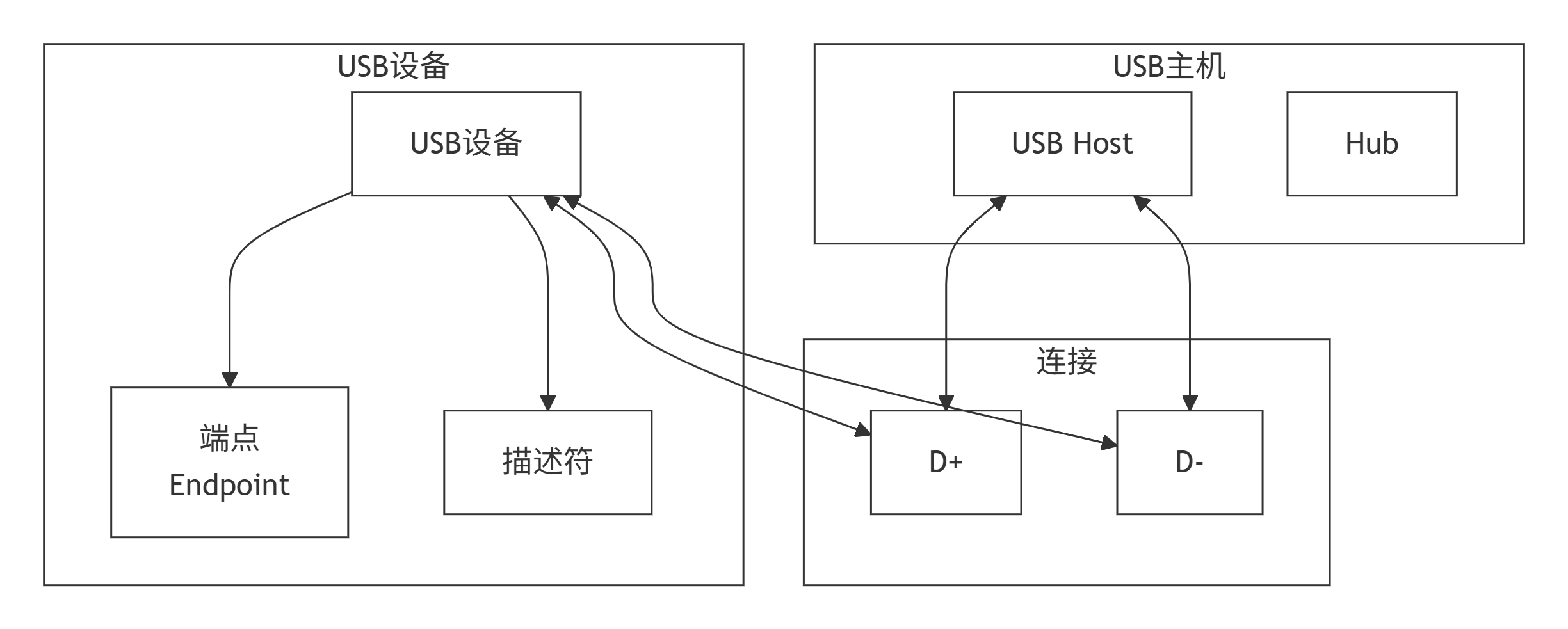
功能描述
USB模块提供的接口:
| 接口声明 | 功能说明 |
|---|---|
| usbd_set_device_info() | 设置 USB 设备信息 |
| usb_init() | 初始化 USB |
| usb_is_devicemode() | 检查设备模式 |
| usb_device_is_host_suspended() | 检查主机暂停状态 |
| usb_device_remote_wakeup() | 远程唤醒 |
| usb_deinit() | 去初始化 USB |
快速验证 USB 烧写链路
社区固件已提供 AT+USBDFUTRIGGER,可直接验证开发板、USB 连接和 BurnTool 的 DFU 烧写链路,无需再创建重复 demo。开发板上已有可启动的基础镜像时,按以下顺序操作:
- 在 BurnTool 中选择
Hi3322-USB,填写Vid=0x3361、Pid=0x3322,选择.fwpkg并点击“Start burn”。 - 使用
750000波特率打开 UART2 串口,发送AT+USBDFUTRIGGER。 - 以 BurnTool 显示 PASS、固件重新上电后版本正确为验收结果。
详细步骤、硬件触发方式和注意事项参见 BurnTool 工具使用指南。该流程需要 Windows 主机、数据 USB 线和已安装的 USB 驱动;USB Device 类、主机暂停和远程唤醒等功能还需要与对应主机软件配合验证,不能由开发板单端自检代替。
开发指引
操作流程

设置设备信息
#define DEV_MASS 5

static void test_usb_mass(void)
{
    uint32_t ret;

    // 厂商描述符(Unicode编码)
    const char manufacturer[38] = {
        'H', 0, 'i', 0, 'S', 0, 'i', 0, 'l', 0, 'i', 0, 'c', 0, 'o', 0, 'n', 0,
        '(', 0, 'S', 0, 'h', 0, 'a', 0, 'n', 0, 'g', 0, 'h', 0, 'a', 0, 'i', 0, ')', 0
    };
    struct device_string str_manufacturer = {
        .str = manufacturer,
        .len = 38
    };

    // 产品描述符
    const char product[18] = {
        'U', 0, 'S', 0, 'B', 0, 'D', 0, 'E', 0, 'V', 0, 'I', 0,
        'C', 0, 'E', 0
    };
    struct device_string str_product = {
        .str = product,
        .len = 18
    };

    // 序列号描述符
    const char serial[16] = {
        '2', 0, '0', 0, '2', 0, '0', 0, '0', 0, '6', 0, '2', 0, '4', 0
    };
    struct device_string str_serial_number = {
        .str = serial,
        .len = 16
    };

    // 设备ID
    struct device_id dev_id = {
        .vendor_id = 0x3361,
        .product_id = 0x0108,
        .release_num = 0x0318
    };

    ret = usbd_set_device_info(DEV_MASS, &str_manufacturer, &str_product,
                               &str_serial_number, dev_id);
    if (ret != 0) {
        PRINT("set fail!\n");
        return;
    }

    PRINT("USB device info set success\n");
}
USB初始化
#define DEV_MASS 5
#define DEVICE 1

static void test_usb_init(void)
{
    uint32_t ret;
    ret = usb_init(DEVICE, DEV_MASS);
    if (ret != 0) {
        PRINT("usb init failed!\n");
        return;
    }

    PRINT("USB init success\n");
}
检查设备模式
bool is_device;

is_device = usb_is_devicemode();
if (is_device) {
    PRINT("USB is in device mode\n");
} else {
    PRINT("USB is in host mode\n");
}
检查主机暂停状态
bool suspended;

suspended = usb_device_is_host_suspended();
if (suspended) {
    PRINT("Host is suspended\n");
} else {
    PRINT("Host is active\n");
}
远程唤醒
uint32_t ret;

ret = usb_device_remote_wakeup();
if (ret != 0) {
    PRINT("Remote wakeup failed!\n");
    return;
}

PRINT("Remote wakeup success\n");
去初始化USB
uint32_t ret;

ret = usb_deinit();
if (ret != 0) {
    PRINT("USB deinit failed!\n");
    return;
}

PRINT("USB deinit success\n");
注意事项
-
字符串格式:描述符字符串必须使用Unicode编码(每个字符后跟0)
-
VID/PID:应使用合法的Vendor ID和Product ID
-
远程唤醒:仅在主机进入挂起状态后可用
-
D+/D-:USB差分信号线,需要注意PCB布局
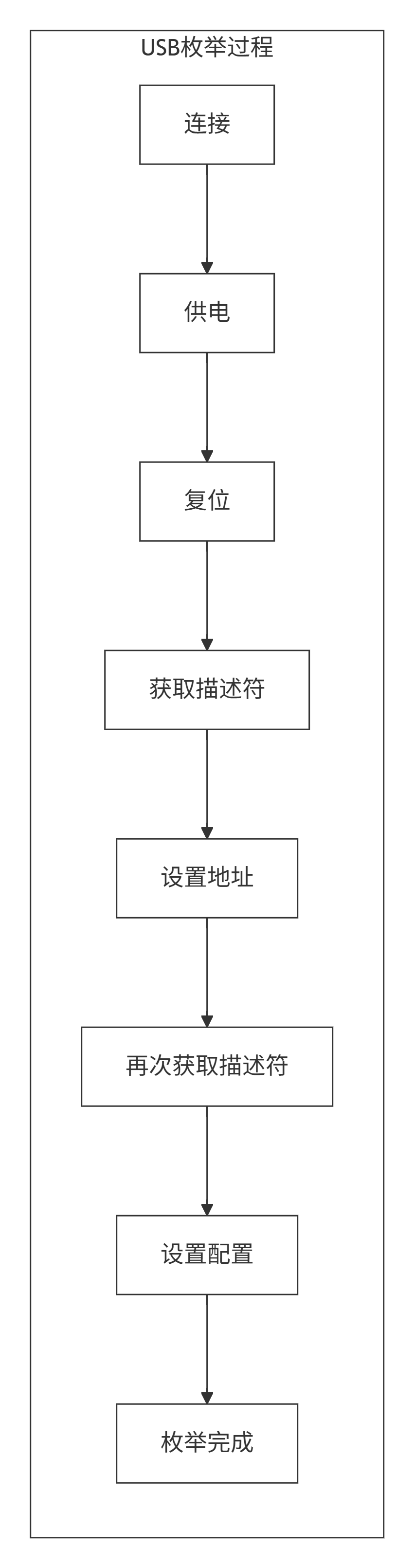
USB速度等级:
| 版本 | 速度 | 说明 |
|---|---|---|
| USB 1.1 | 12Mbps | 低速/全速 |
| USB 2.0 | 480Mbps | 高速 |
| USB 3.0 | 5Gbps | 超高速 |