智能PQ 使用指导
前言
智能PQ(Picture Quality)使用指导为使用海思媒体处理芯片和软件开发包(SDK)快速开发智能编码和智能AE效果提供指导。
与本文档相对应的产品版本如下。
本文档(本指南)主要适用于以下工程师:
-
技术支持工程师
-
软件开发工程师
概述
海思媒体处理芯片提供的智能应用包括:
- 智能编码:编码更低码率与前景保护的控制
-
智能AE:优化人脸欠曝和过曝的效果
其中,本文档重点介绍如何通过SDK软件开发包中API接口、sample快速实现智能AE应用效果。
智能应用总体框架介绍

如图1所示,VENC、ISP是实现智能编码和智能AE的主要模块,这两个模块为开发智能应用提供了API接口。涉及的主要接口有:
-
《MPP 媒体处理软件 V6.0 开发参考》中:
- ss_mpi_venc_enable_svc
- ss_mpi_venc_get_svc_param
- ss_mpi_venc_set_svc_param
- ss_mpi_venc_send_svc_region
-
《ISP 开发参考》中:
- ss_mpi_isp_set_smart_exposure_attr
- ss_mpi_isp_get_smart_exposure_attr
使用以上接口可以进行完整的智能应用的开发。为了方便用户适配,SDK还提供了智能AE使用的参考代码,路径为:mpp/sample/smart_ae。
智能AE
概述
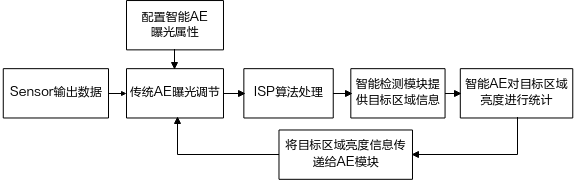
智能AE模块实现的功能:根据智能检测模块提供的检测目标(人脸人形)位置,统计对应画面中目标区域的亮度,作用于ISP AE模块中的曝光收敛。与传统的AE在效果上对比,更加侧重目标区域的曝光。大致流程如下:
API参考
ss_mpi_smartae_update_roi_info
【描述】
根据目标检测结果和帧信息调整画面中人脸人形的曝光。
【语法】
td_s32 ss_mpi_smartae_update_roi_info(ot_vi_pipe vi_pipe, const ot_video_frame_info *frame_info, ot_smartae_roi_info *roi_info);
【参数】
【返回值】
【需求】
- 头文件:ss_mpi_smartae.h
- 库文件:libss_mpi_smartae.a
【注意】
- frame_info的格式只支持YVU420,非压缩格式,不支持低延时模式。
- 分辨率限制与ISP最大最小分辨率一致,具体请见《ISP 开发参考》“系统控制”章节的ot_rect。
- 使用该接口时,需要提前调用ss_mpi_isp_set_smart_exposure_attr打开smart_ae使能。
- 使用该接口时需要使用自动ae,手动ae下该接口不生效。
- 调用该接口传递的人脸人形,距离上一次检测到人脸人形的帧数间隔在proc中有打印,详见《ISP 开发参考》“Proc调试信息说明”章节。
- 该接口不支持wdr模式。
【举例】
参考sample_smart_ae。
【相关主题】
无
数据类型
ot_smartae_roi_info
【说明】
定义智能检测模块传递给smartae的roi目标检测信息。
【定义】
typedef struct {
    td_u32 class_num;

    ot_smartae_obj_class obj_class[OT_SMARTAE_MAX_OBJ_CLASS];
} ot_smartae_roi_info;
【成员】
检测目标类型数量。范围:[0, OT_SMARTAE_MAX_OBJ_CLASS] |
|
【注意事项】
无
【相关数据类型及接口】
ss_mpi_smartae_update_roi_info
ot_smartae_obj_class
【说明】
定义单种目标检测结果。
【定义】
typedef struct {
    ot_smartae_obj_type type;
    td_u32 rect_num;
    ot_smartae_obj objs[OT_SMARTAE_MAX_RECT_NUM];
} ot_smartae_obj_class;
【成员】
目标个数。[0, OT_SMARTAE_MAX_RECT_NUM] |
|
【注意事项】
无
【相关数据类型及接口】
ot_smartae_obj_type
【说明】
定义检测目标类型。
【定义】
typedef enum {
    OT_SMARTAE_OBJ_FACE = 0,
    OT_SMARTAE_OBJ_PEOPLE,
    OT_SMARTAE_OBJ_BUTT
} ot_smartae_obj_type;
【成员】
【注意事项】
无
【相关数据类型及接口】
ot_smartae_obj
【说明】
定义单个检测目标的位置和置信度。
【定义】
【成员】
【注意事项】
- rect的宽高不能超出帧的宽高。
- 置信度score当前不生效,建议设为1。
【相关数据类型及接口】
OT_SMARTAE_MAX_OBJ_CLASS
【说明】
表示智能AE最大识别的目标类型数量。
【定义】
【注意事项】
无
【相关数据类型及接口】
OT_SMARTAE_MAX_RECT_NUM
【说明】
表示智能AE单种类型最大检测数量。
【定义】
【注意事项】
无
【相关数据类型及接口】
sample_smart_ae指南
场景数据流介绍

使用指南
-
运行条件
- 正常demo板
- 对接sensor在sensor list且与编译Makefile一致
-
预期运行结果
- 码流显示正常
- logmpp无报错
- proc信息没有丢帧
- 画面会根据人脸亮暗进行调节
注意:
sample原始代码不包含智能检测库,需手动下载安装并链接对应库,详见sample目录下的readme。
智能AE调试说明
概述
使用智能AE模块对目标区域进行曝光调节,需要保证前端送给智能检测模块的图像能检测出目标区域,所以传统AE模块、drc、gamma、ldci、dehaze等模块,需要对亮度进行合理调节,避免暗区太暗,亮区过曝。调试方式可参考《ISP 图像调优指南》各模块章节。
调试步骤
对目标区域曝光调优,主要包括目标亮度值调试、收敛速度和平滑性优化,以及目标离开后,图像曝光恢复调节。需要使用ss_mpi_isp_set_smart_exposure_attr接口进行相关参数配置,接口及参数含义可参考《ISP 开发参考》。

-
目标区域曝光调节的第一步是先确定目标亮度,目标亮度的调试标准是目标区域无明显过曝或过暗,主要涉及luma_target和曝光系数的调节。
- 当luma_target较大时,如果目标区域处于整个图像较暗区,会导致整个图像过曝区域较多,从而损失过多亮区细节;
- 当luma_target较小时,如果目标区域处于整个图像较亮区,会导致整个图像过暗区域较多,从而损失过多暗区细节。
- 可以使用exp_coef_max和exp_coef_min对目标区域亮度进行一定抑制,根据iso和曝光量进行自适应调节,以确保曝光的合理性,可参考自适应示例代码章节示例代码。
-
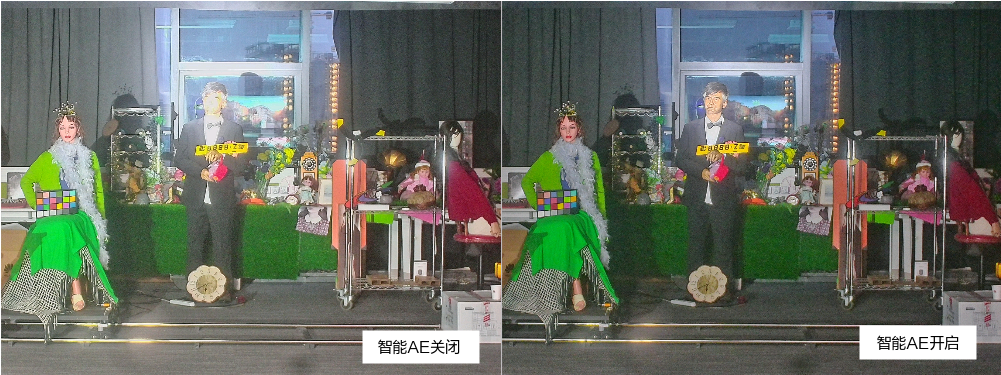
调节收敛速度和平滑性。调整智能运行间隔smart_interval与智能调整速度smart_speed均可以调整收敛速度。但智能运行间隔建议与智能检测保持一致,主要通过smart_speed来调整收敛速度。收敛速度和平滑性存在一定平衡,在防止出现震荡的前提下,可以适当提高收敛速度,如果出现收敛震荡的现象,需要适当降低调整速度。智能AE的收敛速度和平滑性可以在目标区域明显过亮或过暗的场景下,开关智能AE进行调节。
- 调节目标离开后图像曝光恢复时间。曝光恢复时间通过smart_delay_num控制,smart_delay_num不宜调节过小,否则在智能检测波动的场景容易出现亮度震荡。此外,在目标进出频繁的场景,建议smart_delay_num适当调大,避免出现图像亮度反复调节的情况。
自适应示例代码
    ot_isp_exp_info exp_info;
    ot_isp_wb_attr wb_attr;
    ot_isp_smart_info smart_info;
    ot_isp_smart_exposure_attr smart_exposure_attr;
    td_s32 ret = 0;

    ret = ss_mpi_isp_get_wb_attr(vi_pipe, &wb_attr);
    if (TD_SUCCESS != ret) {
        printf("ss_mpi_isp_get_wb_attr error!(ret = 0x%x)\n", ret);
        return TD_FAILURE;
    }
    ret = ss_mpi_isp_query_exposure_info(vi_pipe, &exp_info);
    if (TD_SUCCESS != ret) {
        printf("ss_mpi_isp_query_exposure_info error!(ret = 0x%x)\n", ret);
        return TD_FAILURE;
    }
    ret = ss_mpi_isp_get_smart_info(vi_pipe, &smart_info);
    if (TD_SUCCESS != ret) {
        printf("ss_mpi_isp_get_smart_info error!(ret = 0x%x)\n", ret);
        return TD_FAILURE;
    }
    ret = ss_mpi_isp_get_smart_exposure_attr(vi_pipe, &smart_exposure_attr);
    if (TD_SUCCESS != ret) {
        printf("ss_mpi_isp_get_smart_exposure_attr error!(ret = 0x%x)\n", ret);
        return TD_FAILURE;
    }
    if (smart_info.people_roi[0].enable) {
        if (exp_info.iso > 150) { /* iso larger than 150 */
            /* left leftValue right rightValue : 200, 1600, 2000, 1024 */
            smart_exposure_attr->exp_coef_max = scene_interpulate(exp_info.iso, 200, 1600, 2000, 1024);
            /* left leftValue right rightValue : 200, 512, 2000, 400 */
            smart_exposure_attr->exp_coef_min = scene_interpulate(exp_info.iso, 200, 512, 2000, 400);
        } else if (exp_info.exposure > 10000) { /* larger than 10000 */
            /* left leftValue right rightValue : 10000, 2048, 90000, 1600 */
            smart_exposure_attr->exp_coef_max = scene_interpulate(exp_info.exposure, 10000, 2048, 90000, 1600);
            /* left leftValue right rightValue : 10000, 650, 90000, 512 */
            smart_exposure_attr->exp_coef_min = scene_interpulate(exp_info.exposure, 10000, 650, 90000, 512);
        } else {
            /* left leftValue right rightValue : 2000, 1600, 10000, 2048 */
            smart_exposure_attr->exp_coef_max = scene_interpulate(exp_info.exposure, 2000, 1600, 10000, 2048);
            /* left leftValue right rightValue : 2000, 750, 10000, 650 */
            smart_exposure_attr->exp_coef_min = scene_interpulate(exp_info.exposure, 2000, 750, 10000, 650);
        }

        if (wb_attr.bypass == HI_TRUE) {
            smart_exposure_attr->ir_mode = HI_TRUE;
            /* left leftValue right rightValue : 100, 512, 1000, 400 */
            smart_exposure_attr->exp_coef_min = scene_interpulate(exp_info.iso, 100, 512, 1000, 400);
        }
    } else {
        if (wb_attr.bypass == HI_TRUE) {
            smart_exposure_attr->ir_mode = HI_TRUE;
            /* left leftValue right rightValue : 100, 512, 1000, 400 */
            smart_exposure_attr->exp_coef_min = scene_interpulate(exp_info.iso, 100, 512, 1000, 400);
            smart_exposure_attr->exp_coef_max = 1024; /* max exp coef 1024 */
        } else {
            if (exp_info.iso > 150) { /* iso larger than 150 */
                /* left leftValue right rightValue : 200, 1600, 2000, 1024 */
                smart_exposure_attr->exp_coef_max = scene_interpulate(exp_info.iso, 200, 1600, 2000, 1024);
            } else if (exp_info.exposure > 10000) { /* exp larger than 10000 */
                /* left leftValue right rightValue : 10000, 2048, 90000, 1600 */
                smart_exposure_attr->exp_coef_max = scene_interpulate(exp_info.exposure, 10000, 2048, 90000, 1600);
            } else {
                /* left leftValue right rightValue : 2000, 2300, 10000, 2048 */
                smart_exposure_attr->exp_coef_max = scene_interpulate(exp_info.exposure, 2000, 2300, 10000, 2048);
            }
            smart_exposure_attr->exp_coef_min = 1024; /* MIN expCoef 1024 */
        }
    }
    ret = ss_mpi_isp_set_smart_exposure_attr(vi_pipe, smart_exposure_attr);
    if (TD_SUCCESS != ret) {
        printf("ss_mpi_isp_set_smart_exposure_attr error!(ret = 0x%x)\n", ret);
        return TD_FAILURE;
    }